Skip to content
Français
Back to the app

Is ArkiaSuite installed on this computer? It is still open: click its red “A” icon in the taskbar at the bottom of the screen, or simply close this tab.

On a phone? The app is still open: go back to it from your list of open apps, or tap its “A” icon.

Using ArkiaSuite in your browser? Back to ArkiaSuite

How do I see the tasks of a single list?

Your tasks can be sorted into several lists (« Mes tâches » (My tasks), “Work sites”…). You can show just one of them.
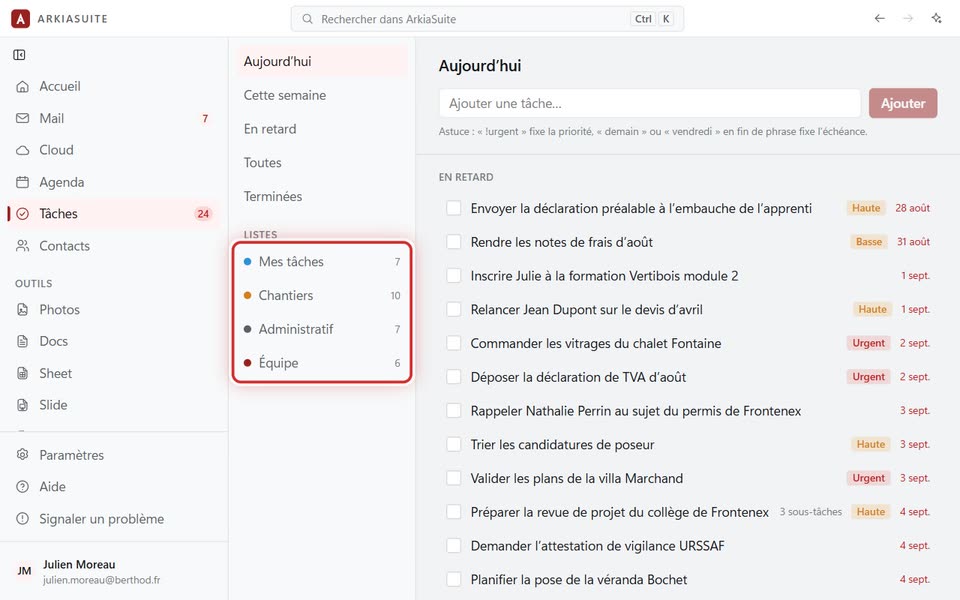
The lists, in the left-hand column
The lists, in the left-hand column — screenshot of the demo, with made-up people.

Step by step

  1. In Tâches (Tasks), look at the left-hand column: under « Listes » (Lists), you see each list with its number of tasks.

  2. Click a list: only its tasks are shown.

  3. To see everything again: click Toutes (All) at the top of the same column.

See also