Skip to content
Français
Back to the app

Is ArkiaSuite installed on this computer? It is still open: click its red “A” icon in the taskbar at the bottom of the screen, or simply close this tab.

On a phone? The app is still open: go back to it from your list of open apps, or tap its “A” icon.

Using ArkiaSuite in your browser? Back to ArkiaSuite

How do I find a contact?

Type a few letters: the name, the company, the e-mail address, even part of a phone number.
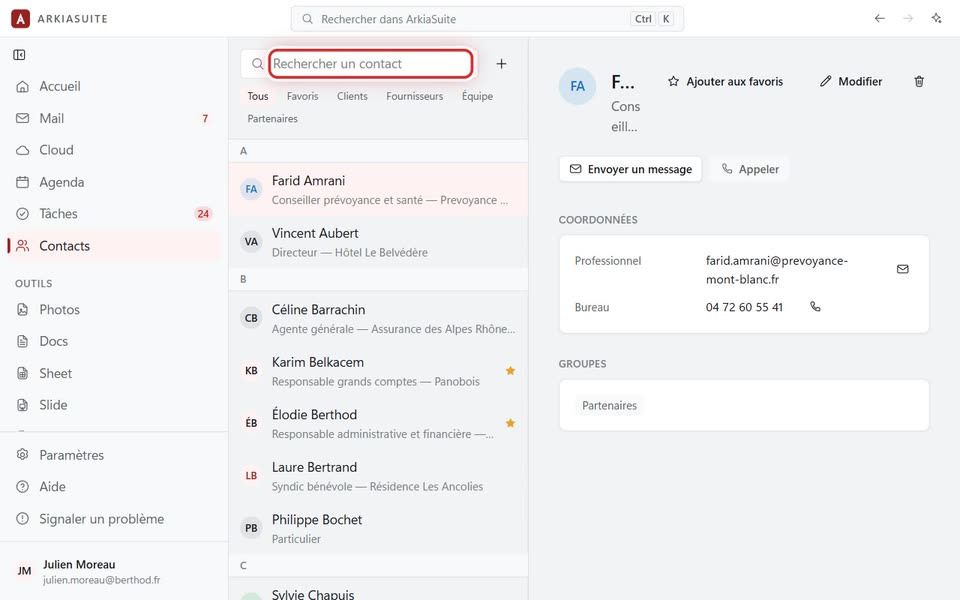
The “Rechercher un contact” field
The Rechercher un contact (Search contacts) field — screenshot of the demo, with made-up people.

Step by step

  1. In Contacts, click in the Rechercher un contact (Search contacts) field at the top of the list.

  2. Type a few letters. The list keeps only the matching contacts.

  3. Click the contact to see their details. The little cross (Effacer la recherche (Clear search)) brings back the full list.

See also