Skip to content
Français
Back to the app

Is ArkiaSuite installed on this computer? It is still open: click its red “A” icon in the taskbar at the bottom of the screen, or simply close this tab.

On a phone? The app is still open: go back to it from your list of open apps, or tap its “A” icon.

Using ArkiaSuite in your browser? Back to ArkiaSuite

How do I save a photo to my computer?

Downloading a photo puts a copy of it on your computer, for example to print it.
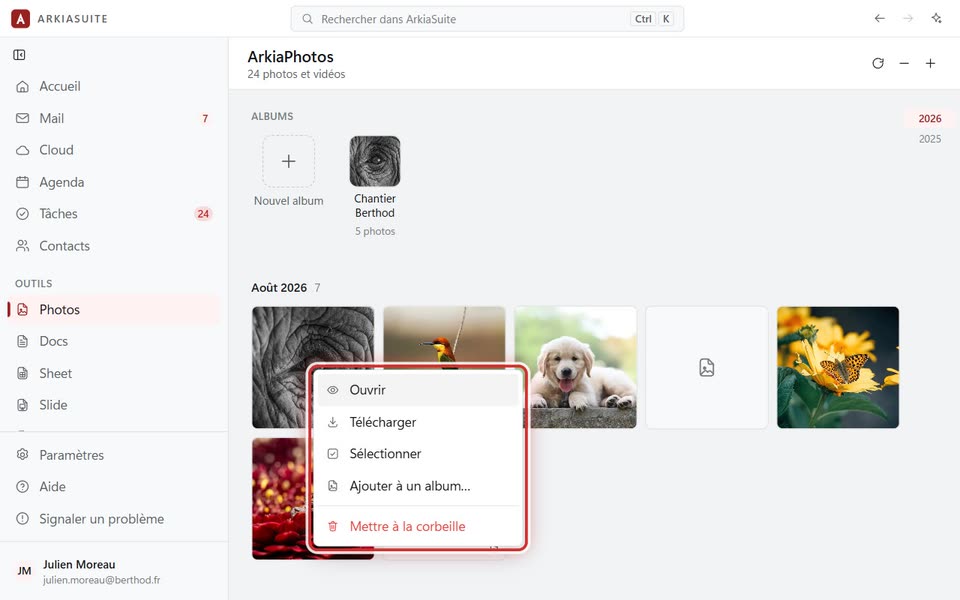
Right-clicking a photo: “Télécharger”
Right-clicking a photo: Télécharger (Download) — screenshot of the demo, with made-up people.

Step by step

  1. In Photos, right-click the photo.

  2. Click Télécharger (Download).

  3. When the photo is open full size, the Télécharger (Download) button at the bottom does the same thing.

See also