How do I get from one tool to another?
ArkiaSuite brings several tools together. They are all in the left-hand column, always in the same place.
Step by step
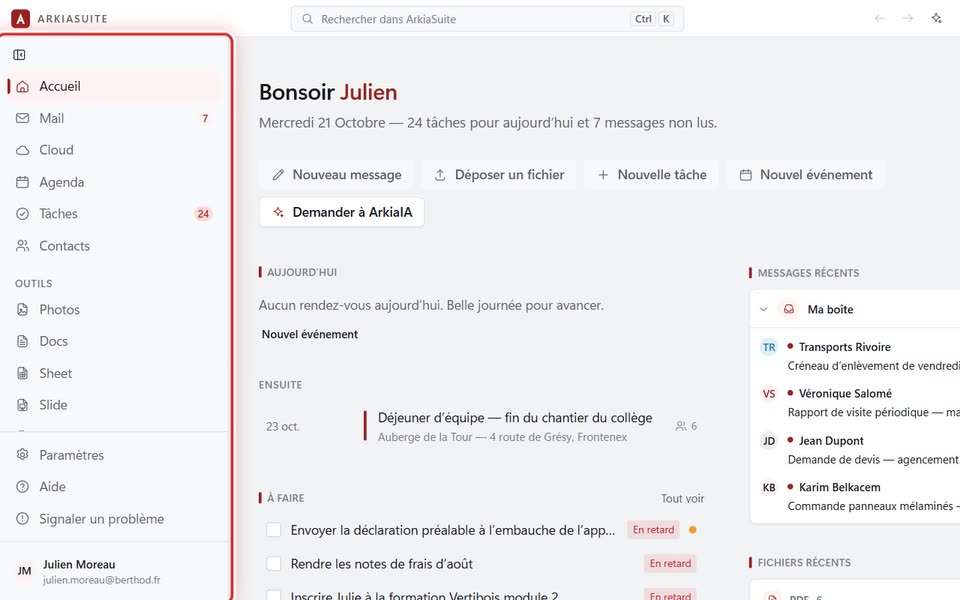
Look at the left-hand column: Accueil (Home), Mail, Cloud, Mon coffre (My vault) (your passwords, on the computer), Agenda (Calendar), Tâches (Tasks) and Contacts.
Below them, under « Outils » (Tools): Photos, and the documents Docs, Sheet, Slide and PDF.
At the very bottom: Paramètres (Settings) (the settings), Aide (Help), which opens this help right at the section for the tool you are using, and Signaler un problème (Report a problem), to write to us.
Click a name to open that tool. A red number next to Mail counts your unread messages.
At the very top, the Rechercher dans ArkiaSuite (Search ArkiaSuite) bar finds a message, a file or a contact.
Good to know
- On a phone, the less-used tools are behind Plus (More), at the bottom of the screen; help is at the very bottom of it: Aide en ligne (Online help), then Signaler un problème (Report a problem).