How do I report a problem?
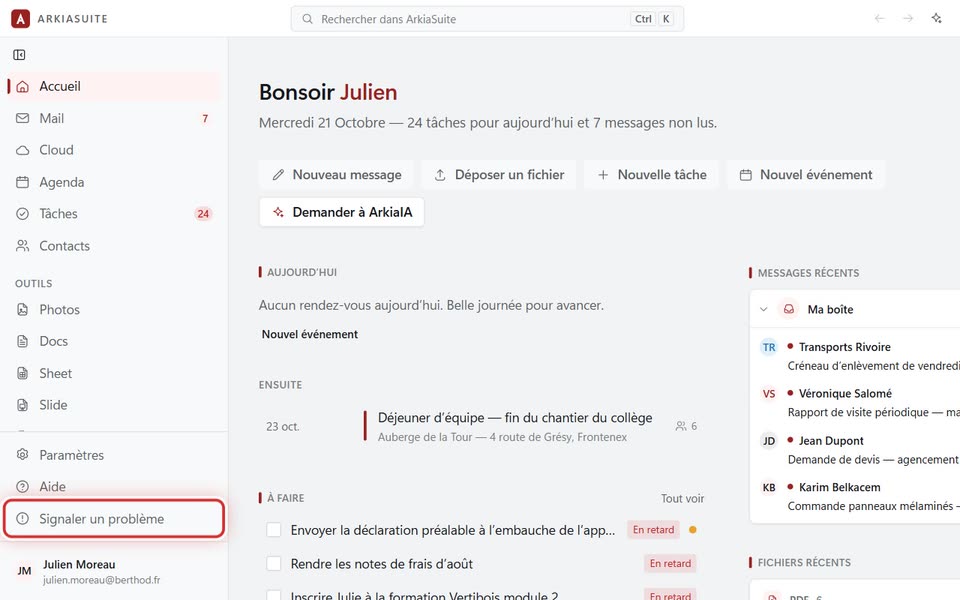
The Signaler un problème (Report a problem) button opens a request to our team, where you are already recognized: all you have to do is say what’s wrong.
Step by step
In ArkiaSuite, at the bottom of the left column, under Aide (Help), click Signaler un problème (Report a problem). (On a phone: Plus (More), then Signaler un problème (Report a problem), at the very bottom.)
« Votre demande s’ouvre dans le navigateur » (Your request is opening in the browser): the Signaler un problème (Report a problem) page appears, and it already knows who you are.
In Décrivez le problème (Describe the problem), write what you were doing, what happened and the message shown, if there was one.
If you can, add a picture of the screen in Captures d’écran (Screenshots).
Click Envoyer ma demande (Send my request). We’ll reply by email.
Good to know
- A tool shows an error screen? The Signaler ce problème (Report this problem) button, just below, opens the same request.
- The button is in the apps and in ArkiaSuite Web (app.arkiasuite.fr). If you aren’t signed in, the same form opens: just enter your email address.
- It’s urgent, or ArkiaSuite won’t open anymore? Call us at 09 51 56 59 54.