Where are my e-mails?
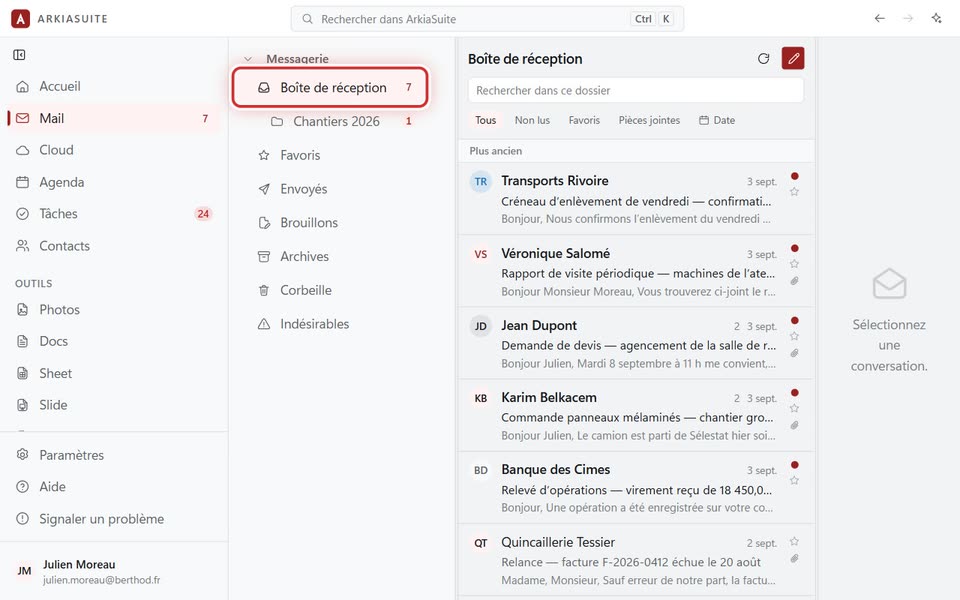
Your e-mails are in Mail, the second tool in the left-hand column. New ones arrive in the Boîte de réception (Inbox).
Step by step
Click Mail in the left-hand column (on a phone: Mail, at the bottom of the screen).
On the left is the folder column: Boîte de réception (Inbox) (messages you received), Envoyés (Sent) (the ones you wrote), Brouillons (Drafts), Corbeille (Trash)…
In the middle is the list of messages in the chosen folder. Clicking a message opens it on the right.
You have several mailboxes? Each one has its own folders, one below the other.
Good to know
- A message you were expecting isn’t there? See I’m waiting for a message that doesn’t arrive.