Something isn’t working: what should I do?
Most problems can be fixed in a few steps. And if not, we’re just a phone call away.
Step by step
Check your Internet connection: does a website open?
See if there is a maintenance banner at the top of ArkiaSuite.
Close ArkiaSuite and open it again. On a computer, really quit it: right-click the “A” icon near the clock, then Quitter (Quit).
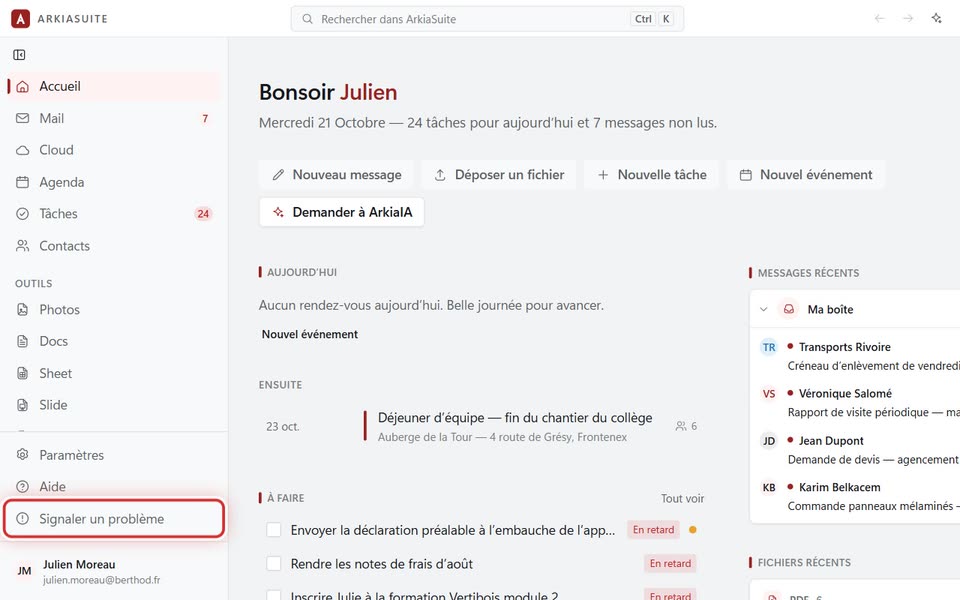
Still stuck? In ArkiaSuite, click Signaler un problème (Report a problem) at the bottom of the left column and describe what is happening: see how. An error screen also offers Signaler ce problème (Report this problem).
In a hurry, or ArkiaSuite won’t open at all? Call us at 09 51 56 59 54, or write to contact@arkiasuite.fr.
Good to know
- All the mailboxes in the same office refuse to open at once? A wrong password typed several times can get the office’s Internet address blocked for security. Call us: we’ll unblock it.