Why don’t my phone and my computer show the same thing?
Everything lives on our servers, and each device reads it again from there. A small lag almost always sorts itself out in a few seconds.
Step by step
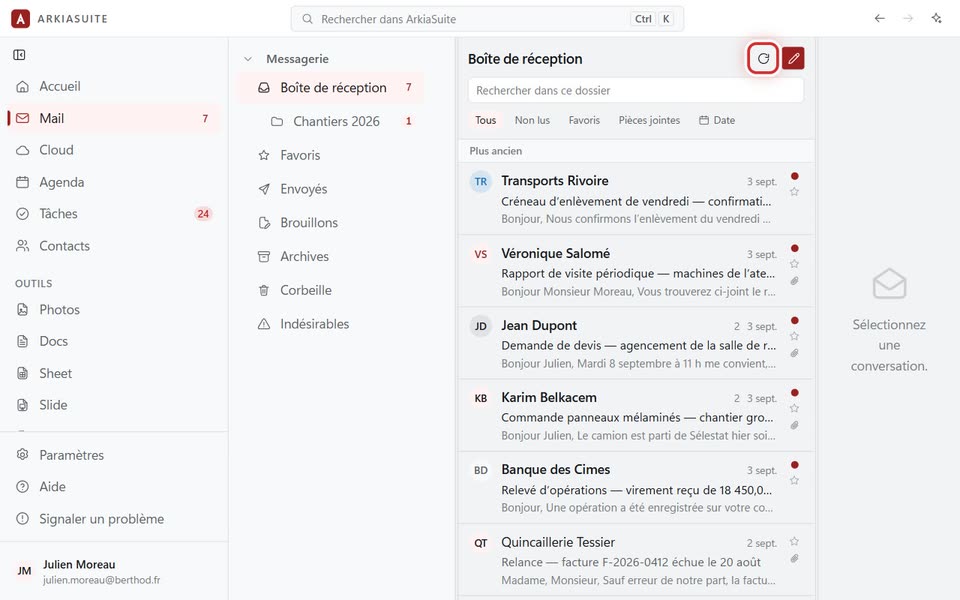
Wait a moment, then refresh: in Mail and the Cloud, it’s the circular arrow (Actualiser (Refresh)), above the list.
Check that both devices are connected to the Internet.
Check that it’s the same account on both: your name, at the bottom of the left-hand column (on a phone: Réglages (Settings) → Compte (Account)).
A mailbox added on the computer isn’t on the phone: add it there too, or connect the phone with a QR code, which brings over your mailboxes.
Good to know
- Folders kept offline update again when the Internet connection comes back.