Skip to content
Français
Back to the app

Is ArkiaSuite installed on this computer? It is still open: click its red “A” icon in the taskbar at the bottom of the screen, or simply close this tab.

On a phone? The app is still open: go back to it from your list of open apps, or tap its “A” icon.

Using ArkiaSuite in your browser? Back to ArkiaSuite

How do I change a calendar’s name or color?

A calendar’s color is used for all its appointments: handy for telling work, family and the club apart.
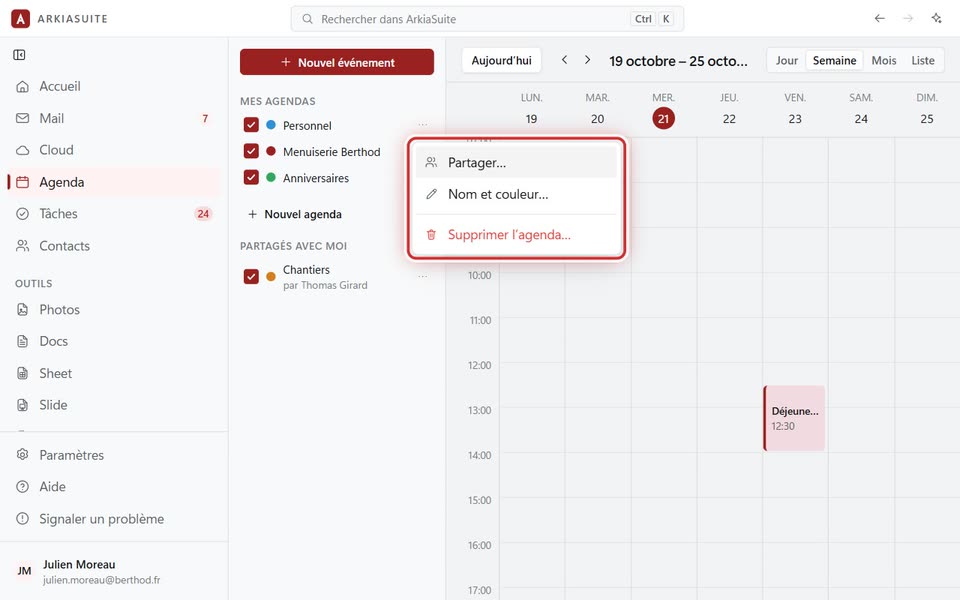
The three-dot menu: “Partager…”, “Nom et couleur…”, “Supprimer l’agenda…”
The three-dot menu: Partager… (Share…), Nom et couleur… (Name and color…), Supprimer l’agenda… (Delete calendar…) — screenshot of the demo, with made-up people.

Step by step

  1. In Agenda (Calendar), click the three dots … to the right of the calendar’s name.

  2. Click Nom et couleur… (Name and color…).

  3. Change the name, and click the dot of the color you want.

  4. Click Enregistrer (Save).

See also