How do I add an appointment that repeats every week?
A class every Tuesday, a meeting every Monday, a birthday every year: add it once, and it comes back on its own.
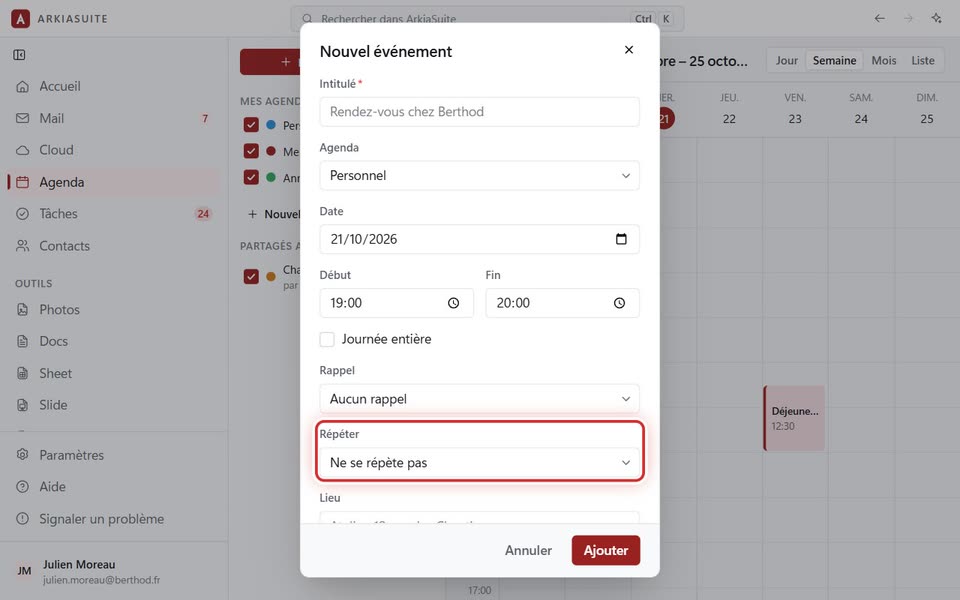
Step by step
In Agenda (Calendar), click Nouvel événement (New event) and fill in the title, the date and the time.
In Répéter (Repeat), choose: Chaque jour (Every day), Du lundi au vendredi (Monday to Friday), Chaque semaine (Every week) (on the same day), Toutes les deux semaines (Every two weeks), Chaque mois (Every month) (on the same day of the month) or Chaque année (Every year).
If the series ends one day, choose the date in Jusqu’au (Until). If you leave it empty, the series never ends.
Click Ajouter (Add). All the appointments in the series appear.
Good to know
- To delete the whole series: click one of its appointments, then Supprimer la série (Delete series).