How do I see a coworker’s calendar?
To see someone’s calendar, they have to share it with you. Then it shows up on your side on its own.
Step by step
Ask your coworker to share their calendar with you (see how to share), using your exact address.
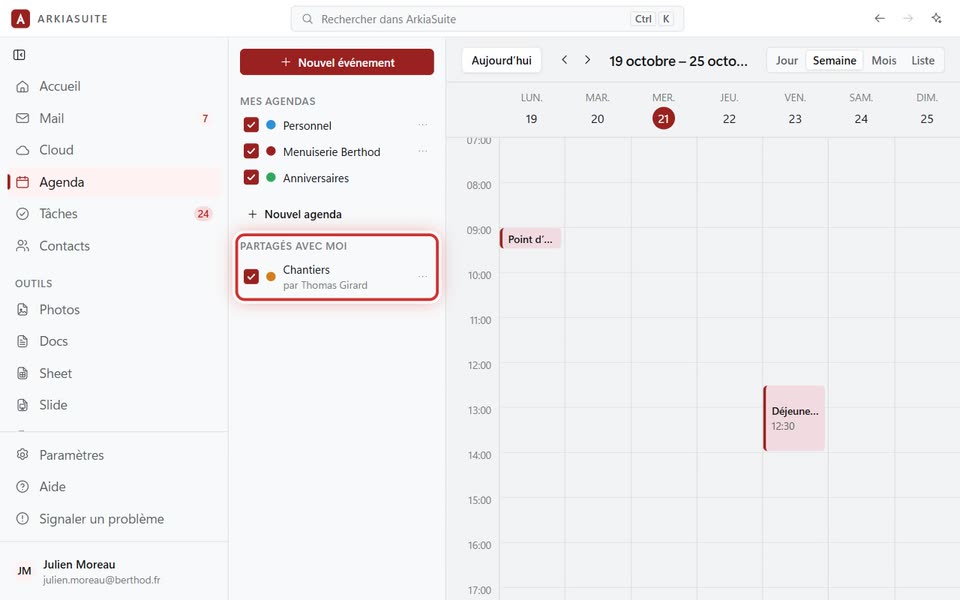
In Agenda (Calendar), look at the left column: their calendar appears under « Partagés avec moi » (Shared with me), with « par » (by) and their name.
Their appointments show up in your calendar, in their color. Check or uncheck the box in front of their name to show or hide them.
Good to know
- A little padlock marks a read-only calendar: you see its appointments but can’t add any.
- Don’t want to see it anymore? The three dots … to the right of its name, then Ne plus recevoir cet agenda (Stop receiving this calendar).
- Can’t find anything? See why you can’t see a coworker.