Skip to content
Français
Back to the app

Is ArkiaSuite installed on this computer? It is still open: click its red “A” icon in the taskbar at the bottom of the screen, or simply close this tab.

On a phone? The app is still open: go back to it from your list of open apps, or tap its “A” icon.

Using ArkiaSuite in your browser? Back to ArkiaSuite

How do I protect a share link with a password?

A password stops anyone who doesn’t know it from opening the link; a date makes it expire on its own.
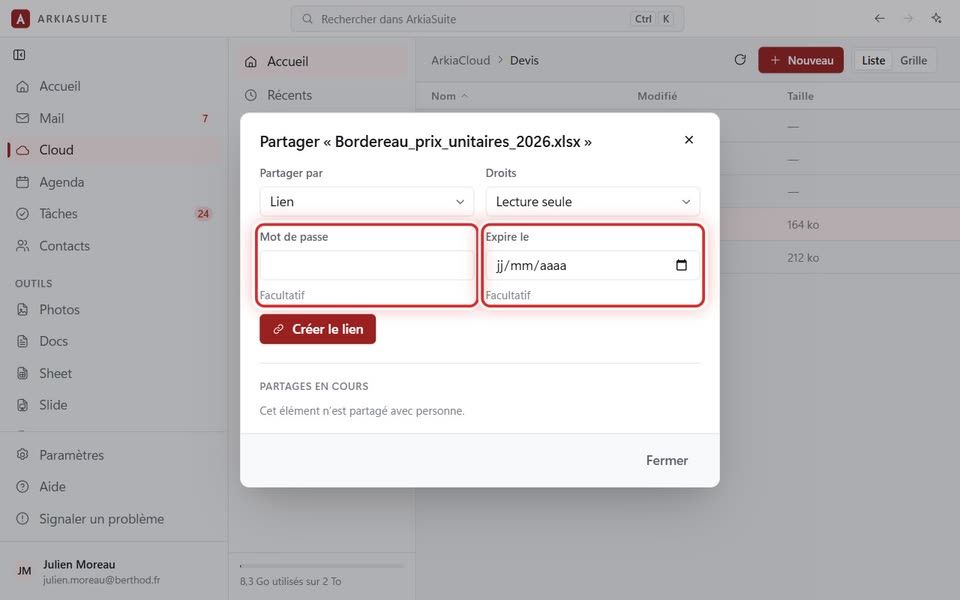
The “Partager” window: “Mot de passe” and “Expire le”
The Partager (Share) window: Mot de passe (Password) and Expire le (Expires on) — screenshot of the demo, with made-up people.

Step by step

  1. In Cloud, right-click the file or folder, then Partager… (Share…).

  2. Leave Partager par (Share via) set to Lien (Link), and choose the Droits (Permissions).

  3. In Mot de passe (Password), type a password of your choice.

  4. If you want it to stop one day, pick the date in Expire le (Expires on).

  5. Click Créer le lien (Create link), then Copier le lien (Copy link).

See also