How do I put a link in a message?
A link is a few words your reader clicks to open a web page, write an e-mail or make a phone call.
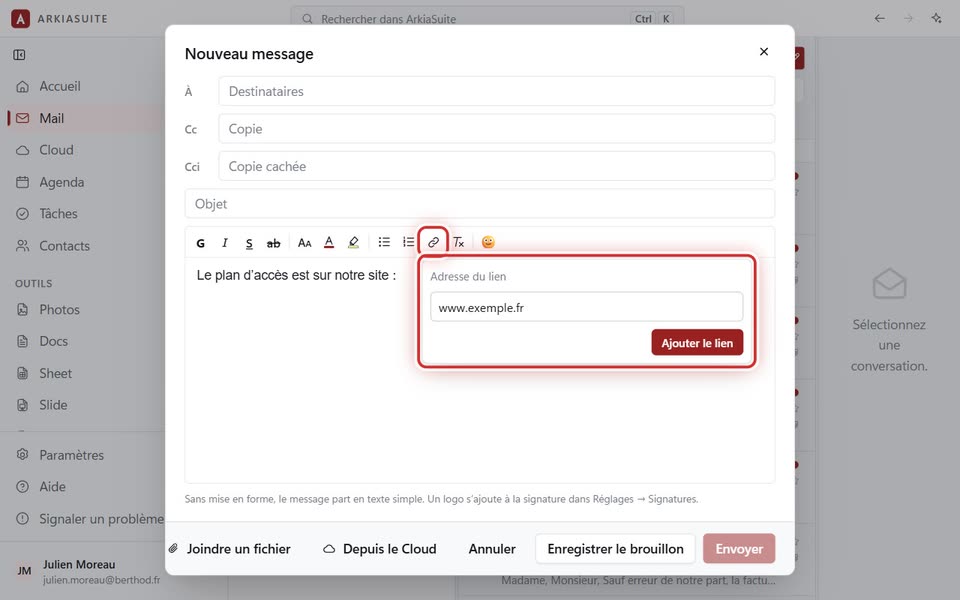
Step by step
In the message window, select the words that will become the link, for example “our website”. If you don’t select anything, the link will simply show its address.
In the toolbar above the text, click the chain link, Ajouter un lien (Add a link).
In Adresse du lien (Link address), type the address: a web page (www.exemple.fr), an e-mail address (nom@exemple.fr), or a phone number preceded by “tel:”.
Click Ajouter le lien (Add link).
To change it, click inside the link: below the toolbar, « Lien vers … » (Link to …) shows its address. Click the chain link, then Modifier (Edit) or Retirer le lien (Remove link).