How do I delete or archive a message?
Deleting sends the message to the Corbeille (Trash). Archiving puts it away, in Archives.
Step by step
Open the message.
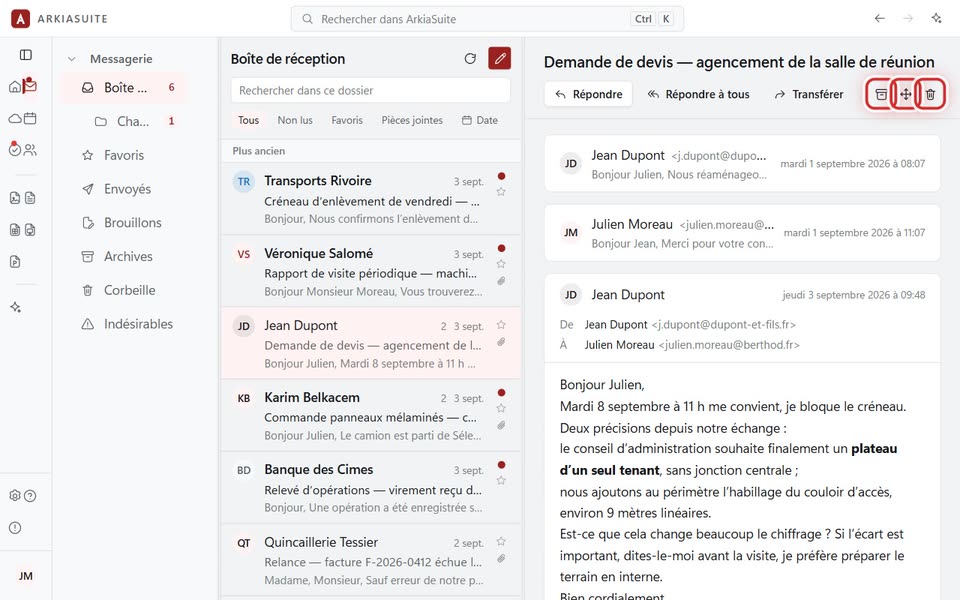
Above the message, on the right, there are three small buttons: Archiver (Archive) (a box), Déplacer vers un dossier (Move to a folder) and Supprimer (Delete) (a trash can).
Click Supprimer (Delete): the message goes to the Corbeille (Trash) folder.
Deleted by mistake? Open the Corbeille (Trash), open the message, then Déplacer vers un dossier (Move to a folder) → Boîte de réception (Inbox).
Good to know
- A message moved to the trash is marked as read: it no longer counts among your messages to read.