How do I open or save an attachment I received?
Received files are at the bottom of the message. A click opens them; a button saves them on your computer or in the Cloud.
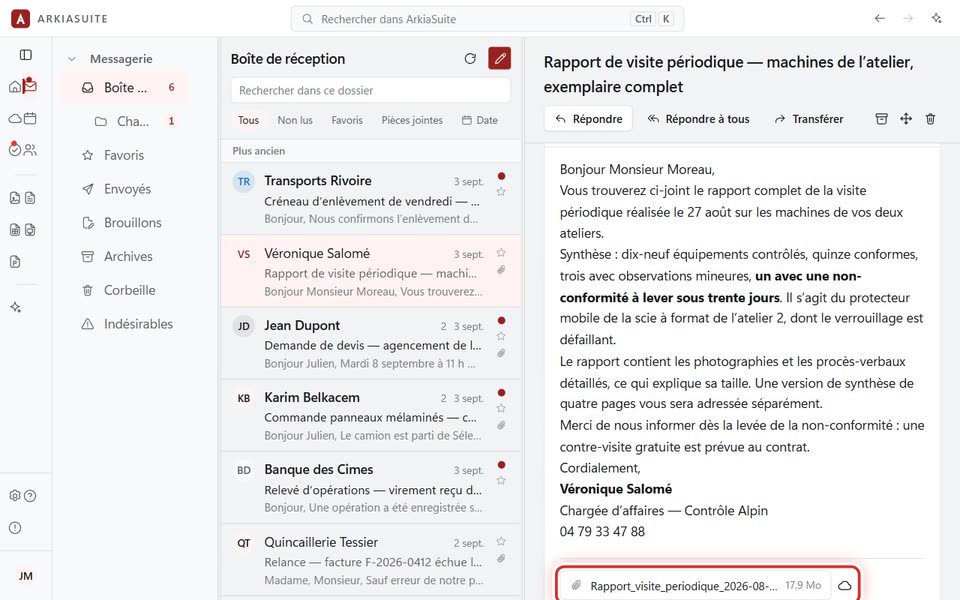
Step by step
Open the message. Its attachments are at the very bottom, each in a small box with a paperclip.
Click the file name: it opens with your computer’s usual program (a PDF in the PDF reader, a photo in the photo viewer…).
To keep it on your computer, click the down arrow right next to it, then choose where to save it.
To put it in your Cloud, click the small cloud, choose the folder, then click Enregistrer ici (Save here).
Good to know
- In a web browser and on a phone, clicking the file saves it in your “Downloads” folder instead of opening it.
- A file with the same name already in the Cloud is never overwritten: the new one gets a “(2)”.