Skip to content
Français
Back to the app

Is ArkiaSuite installed on this computer? It is still open: click its red “A” icon in the taskbar at the bottom of the screen, or simply close this tab.

On a phone? The app is still open: go back to it from your list of open apps, or tap its “A” icon.

Using ArkiaSuite in your browser? Back to ArkiaSuite

How do I mark a message as important?

A star sets a message aside: you can find it again in one click in Favoris (Favorites).
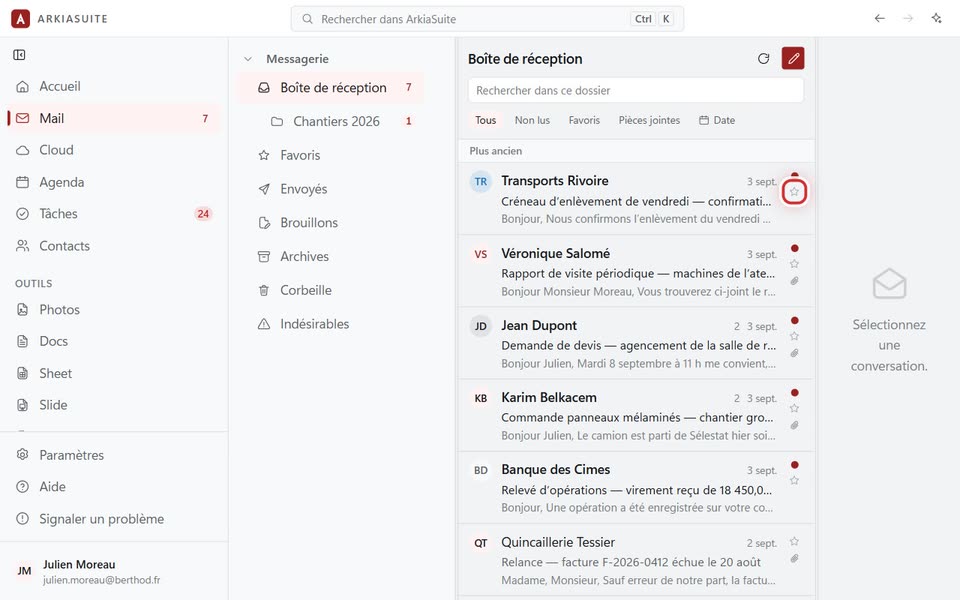
The little star, at the end of each line
The little star, at the end of each line — screenshot of the demo, with made-up people.

Step by step

  1. In the message list, click the little star at the end of the message’s line (Ajouter aux favoris (Add to favorites)). It turns yellow.

  2. To find all your starred messages: click Favoris (Favorites) in the folder column, or the Favoris (Favorites) filter above the list.

  3. To remove the star: click it again (Retirer des favoris (Remove from favorites)).

See also