How do I save a message to finish it later?
An unfinished message can wait in the Brouillons (Drafts) folder, and go out whenever you want.
Step by step
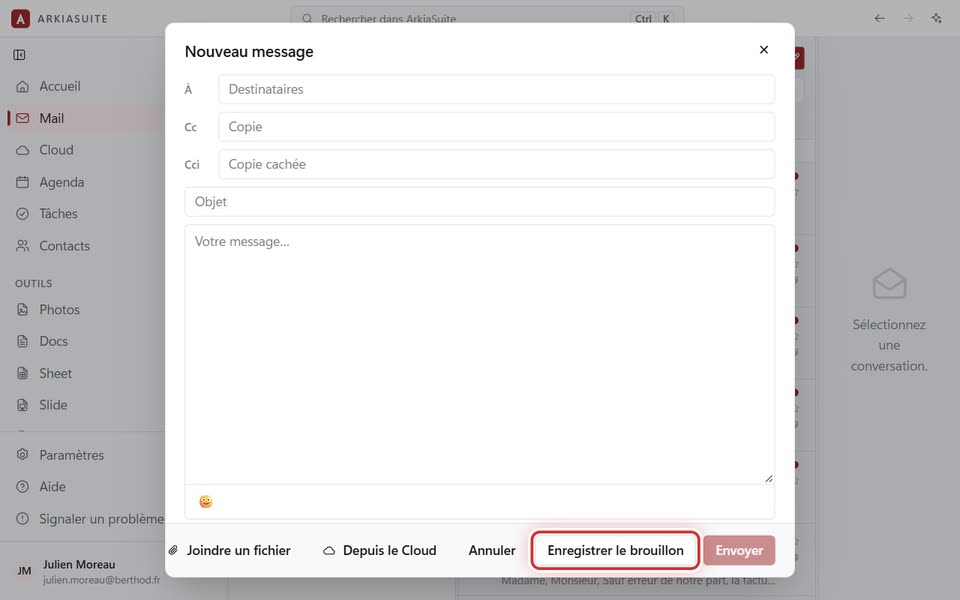
In the message window, click Enregistrer le brouillon (Save draft). « Brouillon enregistré » (Draft saved) appears.
If you close the window without thinking, ArkiaSuite asks « Garder ce message dans les brouillons ? » (Keep this message in drafts?): click Enregistrer le brouillon (Save draft).
Later, click the Brouillons (Drafts) folder, in the folder column.
Open the message, then click Reprendre le brouillon (Resume draft): it comes back just as you left it, attachments included.
Good to know
- Ne pas garder (Don’t keep) closes the window and throws away what you had written; Continuer à écrire (Keep writing) takes you back to the message.